CAM FieldOps Alerts — how people opt in to text messages
C.A. Murren & Sons Co., Inc. · CAM FieldOps
Who can opt in
CAM FieldOps is CAM’s internal field operations app. Only CAM employees with a company sign-in can use it, so the opt-in below sits behind that sign-in. This page shows the same opt-in control publicly so it can be reviewed. No one is enrolled automatically, and no number is collected from a web form: messages go only to the mobile number on the employee’s HR record, and only after that employee turns text alerts on themselves.
The opt-in flow
- The employee signs in to CAM FieldOps with their company account.
- They open Settings › Notifications and go to the Text message alerts (SMS) card.
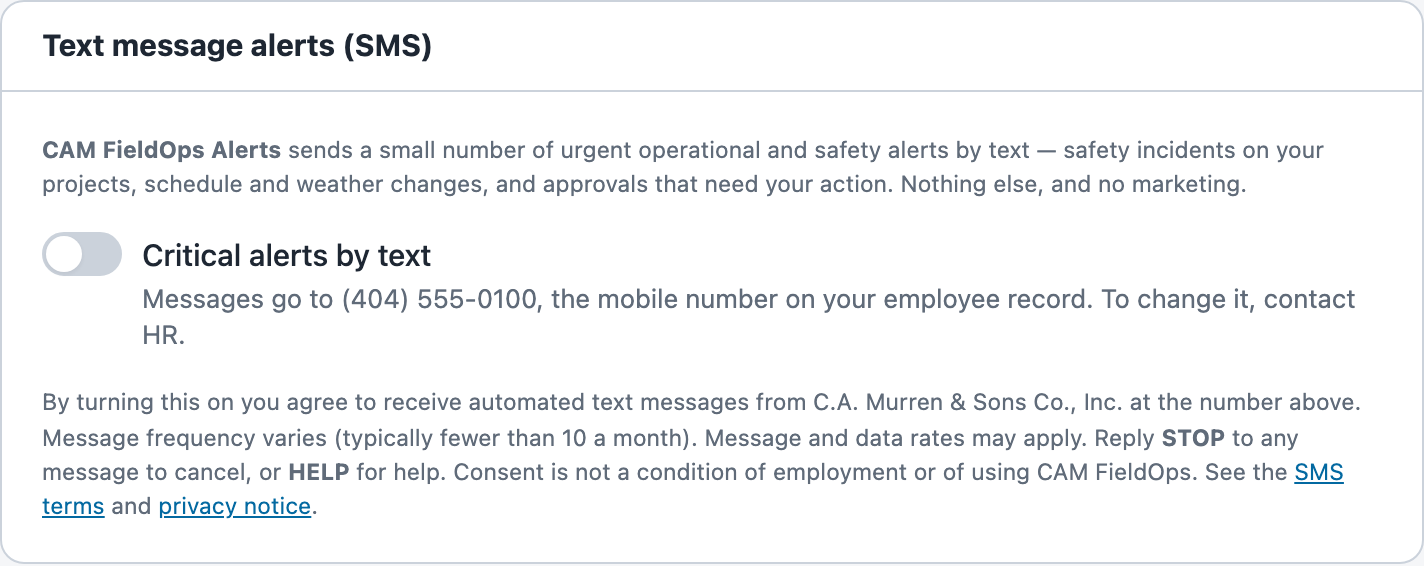
- The card shows the program name, what messages they will get, the number messages go to, message frequency, “Message and data rates may apply”, STOP and HELP instructions, and links to the SMS terms and the privacy notice.
- The Critical alerts by text switch is off by default. The employee opts in by turning it on. The choice and its time are recorded.
- They can opt out at any time by turning the switch off or replying STOP to any message.
Screenshot of the consent card
Settings › Notifications, as an employee sees it before opting in:
Direct link to the image: /terms/sms-opt-in-card.png
The consent card itself
This is the same component the app renders, shown here with a sample number. Trying the switch on this page saves nothing.
CAM FieldOps Alerts sends a small number of urgent operational and safety alerts by text — safety incidents on your projects, schedule and weather changes, and approvals that need your action. Nothing else, and no marketing.
By turning this on you agree to receive automated text messages from C.A. Murren & Sons Co., Inc. at the number above. Message frequency varies (typically fewer than 10 a month). Message and data rates may apply. Reply STOP to any message to cancel, or HELP for help. Consent is not a condition of employment or of using CAM FieldOps. See the SMS terms and privacy notice.
Contact
Text alert support: it@camurren.com · 770.682.2940